Created on
Updated on
VFX Editorial & Matchmove
Preface: Welcome back, let’s move along.
VFX Editorial
The edit suite and the VFX pipeline are joined at the hip in a way that most people outside of post-production don’t fully understand. They look like separate departments doing separate work. In practice, every decision made in the edit has a direct consequence for VFX, and every piece of VFX work in progress is contingent on what the edit does next. The relationship between these two departments is one of the most important and most frequently mismanaged in all of post-production.
The VFX editor is not the same person as the main picture editor. The picture editor cuts the film. The VFX editor manages the flow of material between editorial and the VFX pipeline — tracking which shots have been turned over to vendors, maintaining the VFX cut, integrating completed VFX shots back into the edit, and keeping the VFX supervisor and the vendors informed of every editorial change that affects work in progress.
Turnover
When a sequence is ready for VFX work to begin, the VFX editor packages everything a vendor needs to start building a shot and delivers it. This is called a turnover. A turnover package includes the cut picture for the shot — the exact frames the editor is currently using — along with all the camera original footage for that shot, any additional camera angles, reference material, pull lists specifying which files are which, and technical specifications the vendor needs to know about frame rate, resolution, color space, and aspect ratio.

The turnover is the formal handoff between editorial and production. Once a vendor receives a turnover, they begin building. The clock starts. The budget starts spending.
The Locked Cut Problem
Here is the fundamental tension in VFX post-production: vendors need a locked cut to build against, but the cut is almost never locked when the pressure to start VFX work is highest.
Every VFX shot is built to a specific frame range in a specific position in the edit. If the picture editor trims four frames off the head of a shot, a digital character who was timed to enter the frame on a specific beat now enters four frames early. If the editor replaces a shot with a different angle entirely, everything built for the original shot is discarded. If a sequence gets restructured and shots move to different positions, the carefully timed action and camera work that vendors built may no longer cut together the way it did when the work started.
Productions manage this by establishing cut-off points — versions of the edit that are locked for specific sequences even if the rest of the film is still being worked on. But in practice, directors keep making changes, and vendors keep building against cuts that aren’t truly stable. The VFX editor’s job is to track every change, communicate it to every affected vendor immediately, and quantify the cost of that change in additional work. When a director requests an editorial change to a sequence that has already been turned over, the VFX editor is the person who tells the room what that change costs before it gets approved.
Productions that don’t manage this rigorously end up paying for work twice — building shots once against an early cut, then rebuilding them when the cut changes. On a large film with hundreds of VFX shots across multiple vendors, undisciplined editorial management can add millions of dollars to the VFX budget and months to the schedule. The waste is invisible to the director because it happens in the vendor’s pipeline, not on screen. But it’s real, and it compounds.
Integrating Completed Shots
As vendors complete shots and deliver them, the VFX editor integrates them into the edit — replacing the postvis or temp placeholder with the finished VFX shot. This sounds simple. It isn’t always. A finished shot might be delivered at a different color grade than the surrounding footage and need to be flagged for the colorist. It might have a slightly different frame count than expected and require an editorial adjustment. It might have a technical issue — a visible artifact, a wrong frame embedded in the delivery — that needs to go back to the vendor for a fix before it can sit in the cut.
The VFX editor is the quality gate between vendor delivery and the cut. Nothing goes into the edit without passing through them first.
Matchmove
Every VFX shot starts with the same foundational problem: the camera on set was a physical object moving through real space, and everything that gets added to the shot digitally needs to move as if it exists in that same real space, as seen by that same moving camera. Matchmove — also called tracking — is the process of solving that problem.
A matchmove artist analyzes the footage from a shot and reconstructs the camera’s movement as a precise mathematical description in three-dimensional space. Where was the camera at frame one? Where was it at frame fifty? How did it rotate, how did it translate, how did its focal length behave? The matchmove produces a virtual camera in 3D software that replicates the real camera’s behavior exactly. When a digital character or object is placed in the shot, it gets rendered through that virtual camera — and because the virtual camera moves exactly like the real one did, the digital element moves with it. The dragon stays on the wall. The spaceship stays in the sky. The digital crowd stays on the street.
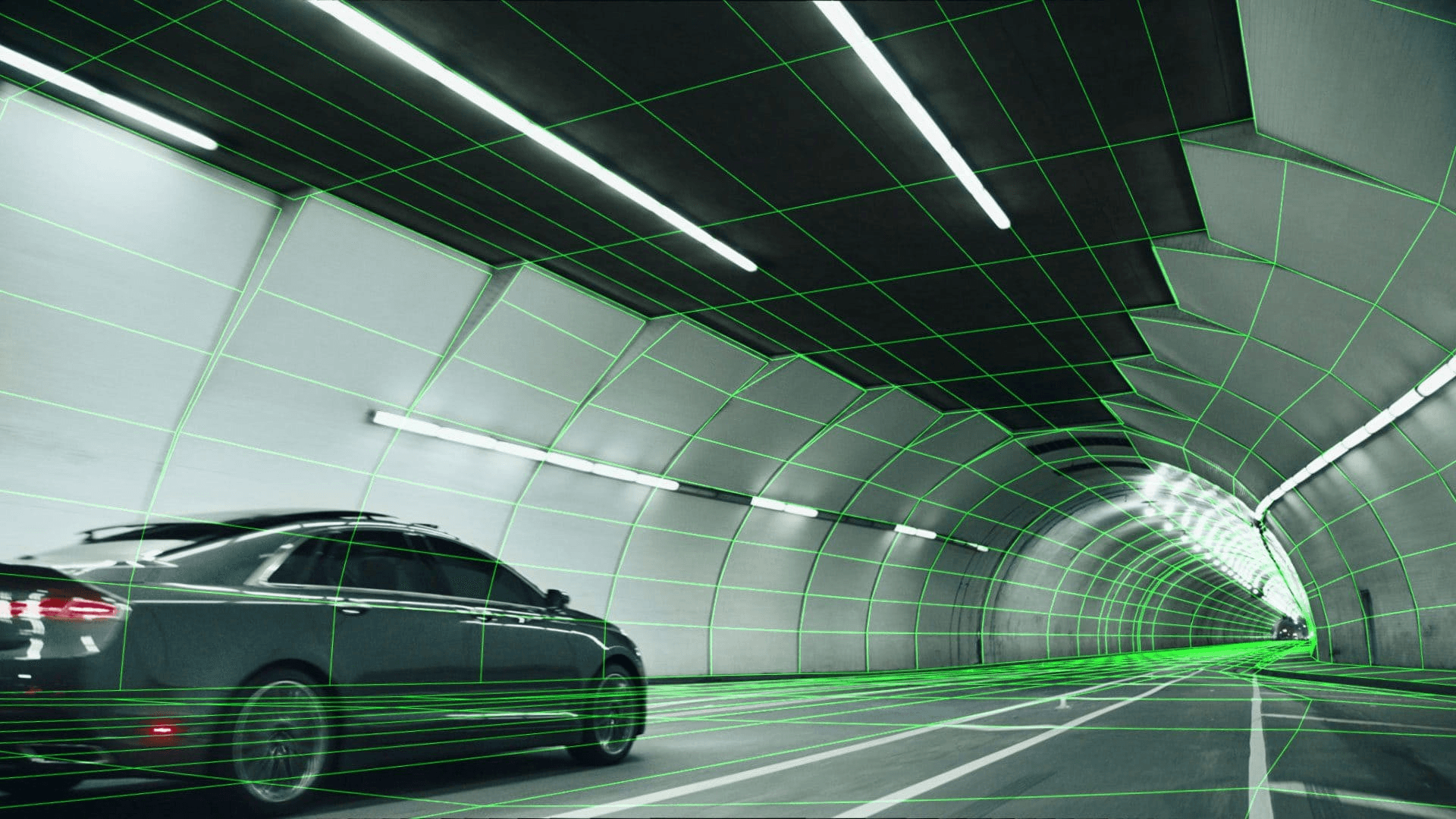
Without accurate matchmove, none of the work that happens afterward matters. A digital element that doesn’t correctly track to the camera’s movement slides around the frame, detaching from the physical world it’s supposed to inhabit. It becomes immediately, unmistakably fake — not because it was modeled or lit badly, but because it’s moving wrong. Matchmove is foundational. Everything else in the VFX pipeline is built on top of it.
How Matchmove Works
The matchmove artist works from the camera original footage, the lens data recorded on set, and the tracking markers that were placed on the greenscreen or on the set surfaces. Software analyzes the movement of identifiable features across frames — the tracking markers, or natural features in the image if markers weren’t placed — and uses the parallax relationships between those features to calculate the camera’s position and orientation in three-dimensional space at every frame.
This process is called a solve. A good solve means the virtual camera’s movement matches the real camera’s movement with submillimeter accuracy. A bad solve — caused by insufficient tracking features, occluded markers, motion blur that obscures the reference points, or footage that simply doesn’t have enough visual information for the software to work with — produces a camera that drifts, wobbles, or snaps, and anything tracked to it will do the same.
When software alone can’t produce a clean solve, the matchmove artist works manually — identifying features by hand, adjusting the solve frame by frame, adding constraints until the virtual camera locks. This is slow, precise work that requires understanding of both the software and the physics of camera movement. A complex handheld shot with heavy motion blur and limited tracking markers can take days to solve cleanly.
Object Tracking
Camera tracking solves the movement of the camera. Object tracking solves the movement of objects within the shot — an actor’s body, a vehicle, a prop. If a digital element needs to be attached to a moving object rather than the static world, object tracking isolates the movement of that specific thing in three-dimensional space.
A digital weapon attached to an actor’s hand. An augmented reality display that needs to sit on the dashboard of a moving car. A creature that needs to react physically to being touched by a performer. All of these require not just camera tracking but object tracking, and the two solves need to be consistent with each other. The object tracking has to exist in the same three-dimensional space as the camera tracking or the relationships between elements fall apart.
Face Tracking and Performance Capture
At the most detailed end of tracking sits facial tracking — analyzing the movement of an actor’s face to drive a digital character’s performance. This is how the performance capture pipeline works: markers placed on the actor’s face during shooting get tracked frame by frame, and that tracking data drives the corresponding points on a digital facial rig. The actor’s performance translates directly into the digital character’s movement.
Facial tracking is among the most technically demanding work in the pipeline. The human eye is extraordinarily sensitive to facial movement — we read emotion from millimeter-scale muscle changes. Any inaccuracy in the tracking, any drift or jitter in the data, reads immediately as wrong. The uncanny valley in digital characters is often less about the modeling and more about tracking data that doesn’t quite capture the subtlety of a real performance. Getting facial tracking right requires clean marker data from set, precise tracking solves, and then a layer of animation cleanup on top of the raw data to smooth and refine what the tracking captured.
Layout
Once tracking is complete, the next step is layout — establishing the three-dimensional composition of the shot before animation and effects work begins. Layout takes the matchmove camera, the set geometry from LIDAR and photogrammetry, and the rough character and asset positions, and assembles them into a working scene that accurately represents the spatial relationships in the shot.
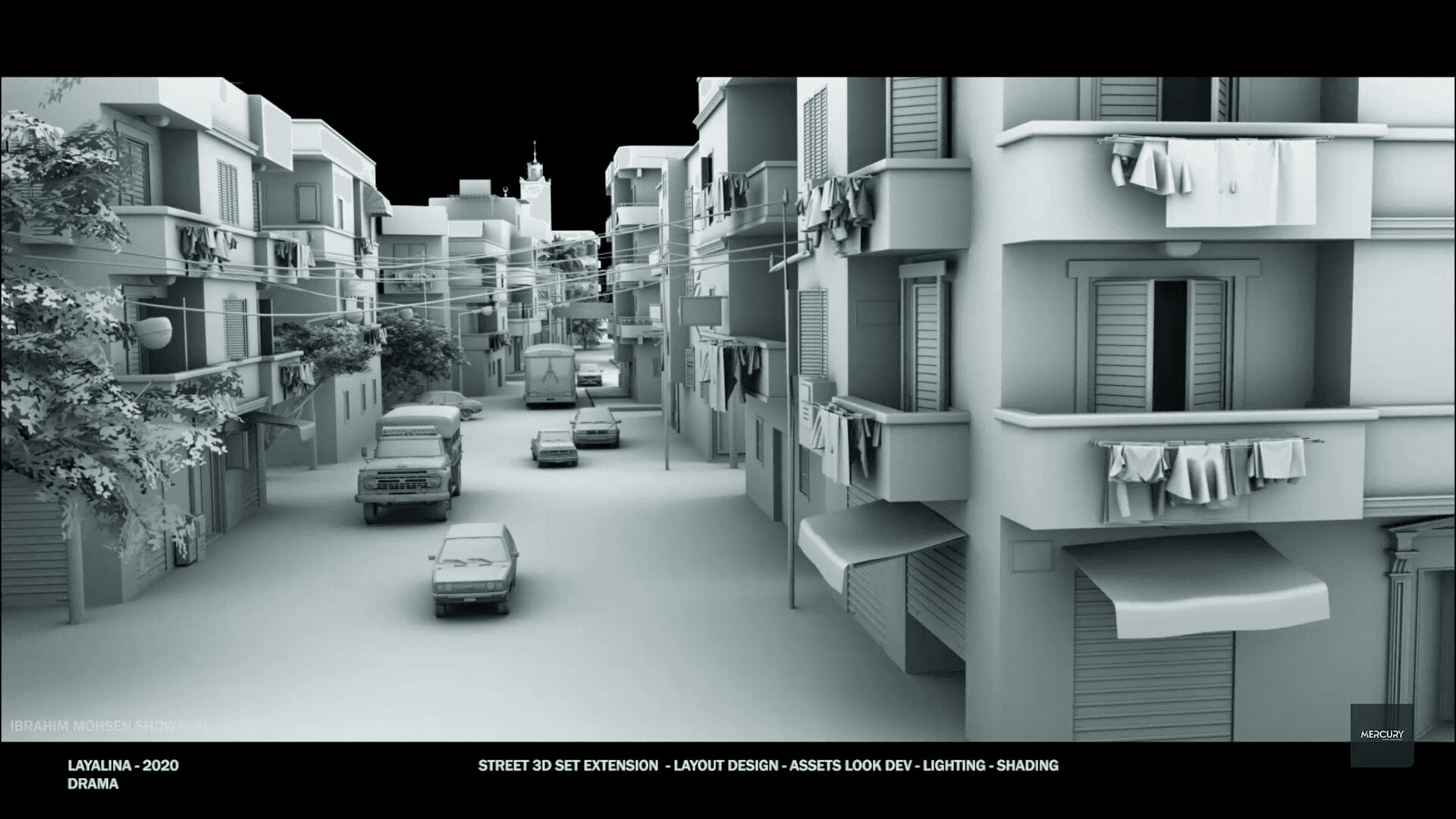
Layout is the check. If the matchmove is correct and the set geometry is accurate, the digital elements placed in layout should sit exactly where they need to be relative to the plate footage. If something doesn’t line up — a character who should be standing on a floor is floating above it, an object that should be behind a wall is in front of it — layout is where that error gets caught and corrected before animation and simulation work begins on top of a broken foundation.
Layout also handles basic animation blocking for shots where multiple digital elements need to be choreographed in space — a crowd sequence, a vehicle chase, a battle involving many characters. The broad strokes of movement get established in layout so that when the animators arrive, they’re refining performances within a spatial framework that already works, rather than figuring out blocking and performance simultaneously.🫶🏼